Backtest Run Time and Trade Count
Why a backtest over thousands of symbols takes hours, and why it can give fewer trades than you expect
Your first backtest over the whole market raises two questions. Why did it take hours when the same strategy on SPY took a minute? And why are there so few trades?
Here's a real example. A backtest of about 8,000 symbols from 2007 to 2026, with Max. open positions set to 5, took 3 hours and 20 minutes and gave about 4,400 trades. The same strategy on SPY alone, over the same years, finished in under a minute with about as many trades.
The two answers are separate. The time comes from the data. The trade count comes from the position limit.
Where the time goes
A backtest's run time depends on symbols times bars, not on how many trades it finds. AmiBroker runs your strategy on every bar of every symbol, whether a trade comes out of it or not.
- One symbol with 20 years of 1-minute bars has close to 2 million bars.
- 8,000 symbols is about 8,000 times as much work as SPY alone. Many symbols have less history than SPY, but the scale is the same.
- A strategy that finds no trades on a symbol still reads all of that symbol's bars to find out.
The position limit doesn't change this. The same backtest with Max. open positions set to 1,000 takes about the same time in its main phase, because AmiBroker finds every signal first and applies the limit afterwards (see below).
When a backtest gets to 100% and then stops responding
A backtest reaches 100%, and then AmiBroker stops responding, sometimes for many minutes. It's usually still working. A backtest has two phases:
- The main phase, which the progress bar counts, runs your strategy over every symbol. It uses all your CPU cores.
- The custom column phase, after 100%, adds the MabeKit columns to each trade. It has to run on a single thread, so AmiBroker looks frozen while it works. It also uses far more memory than the main phase.
This is one backtest over 10 years of 1-minute data, with CPU and memory measured the whole way:
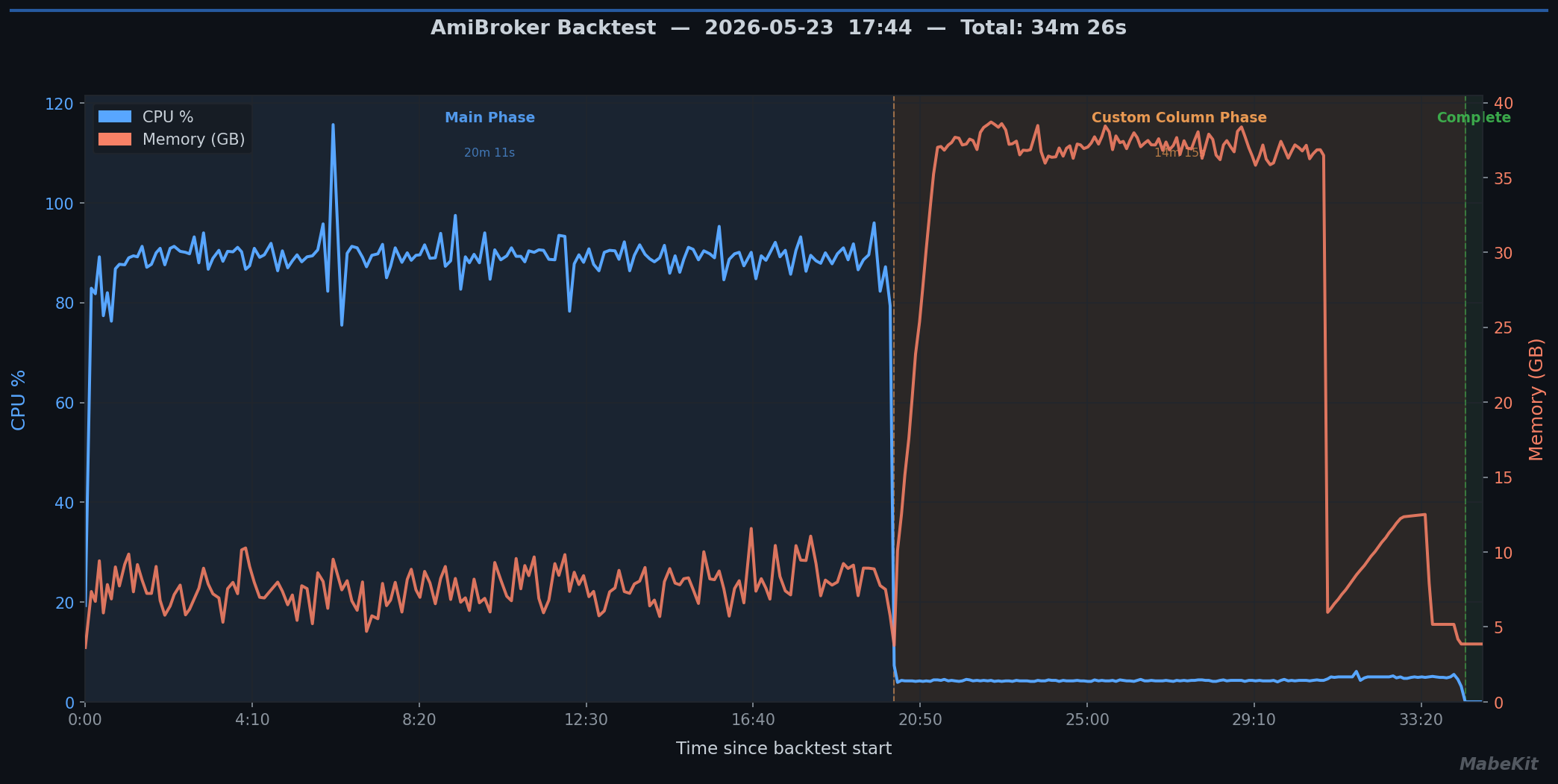
The main phase took 20 minutes, with the CPU near 90% and about 8 GB of memory. The custom column phase took another 14 minutes, with the CPU near 5% and memory climbing to about 38 GB.
- Give it time. Don't close AmiBroker while it's in this phase.
- If it fails or never finishes, your PC may not have enough memory for this phase, which is where a memory-limited PC fails. Run a shorter Range or fewer symbols, so there are fewer trades to add columns to.
The main phase grows with symbols and bars. The custom column phase grows with trades.
Making it faster
- Fence in the universe. A universe filter that drops stocks you'd never trade, like ones with almost no volume, cuts the trades and the noise. See Choosing a Starting Point.
- Only load the years you test. A backtest reads every bar in the database, even when its Range is shorter. See Setting Up AmiBroker and IQFeed on a New Computer.
- Try a short Range first. Run one month over all symbols to check the strategy works before you start a run that takes hours.
- Split it up. If your PC can't handle the full run, run it in pieces (say, 5 years each) and merge the CSV files.
Why there are fewer trades than signals
AmiBroker's portfolio backtester works in two steps:
- It runs your strategy over every symbol and collects every entry and exit signal.
- It then steps through the account bar by bar. An entry signal becomes a trade only if there's a free position and enough money for it.
With Max. open positions at 5, once 5 trades are open, every other entry signal is skipped until one of them closes. Those skipped signals never appear in the trade list. Across 8,000 symbols there can be hundreds of signals on a busy morning, and only 5 of them can be trades. That's how 8,000 symbols can give about as many trades as SPY alone.
A few more things the position limit does:
- It picks which signals win. When there are more signals than free positions, AmiBroker takes the ones with the highest
PositionScore. If your strategy doesn't setPositionScore, you haven't chosen which signals get the positions. - A skipped signal can skip a whole move. When AmiBroker skips an entry on a symbol, it ignores later entries on that symbol until the matching exit signal.
- Cash can limit it too. Even with free positions, a trade AmiBroker can't afford is skipped. When a Backtest Returns No Results shows how much this changes the trade count.
To see the signals AmiBroker skipped and why, set Report to Detailed log on the Report tab of the Analysis window's Settings and run a short Range. The log is long, so keep the run small.
For the Strategy Cruncher, take every trade
A backtest for the Strategy Cruncher should show every trade the strategy would take. The Cruncher's job is to find which filters matter, and it can only judge the trades it sees. A position limit gives it a sample chosen by which positions happened to be free, not by your strategy.
Before a backtest for the Cruncher, open Settings in the Analysis window:
- General tab: set Initial equity very high, e.g. 100,000,000.
- Portfolio tab: set Max. open positions high, e.g. 1,000.
The main phase takes about as long as before. The custom column phase takes longer, because there are more trades to add columns to. How many positions you hold at once, and how much money each one gets, is a sizing decision for after you've found the strategy.