Trade Ideas' 100 Trade Daily Limit
Why a filter from a capped OddsMaker backtest won't match when you run it in Trade Ideas
If your report shows "Trade Ideas capped this backtest at 100 trades a day", read this before you apply any filter from it.
Trade Ideas' OddsMaker keeps at most 100 trades per day. When your strategy signals more than that, OddsMaker keeps 100 of them at random and drops the rest. Nothing in the export tells you this happened. The backtest just looks like a strategy that took 100 trades that day.
How to Spot It
Count the trades on each day of your backtest. A day with exactly 100 hit the limit.
Sometimes it's obvious: every day has 100 trades, and the backtest has 100 times as many trades as days. Sometimes it's one or two busy days in a year. Both are a problem. The Strategy Cruncher counts them for you and tells you how many of your days hit the limit.
Why Your Filter Won't Match
Here's what happens on one capped day when you take a filter from the report back to Trade Ideas:
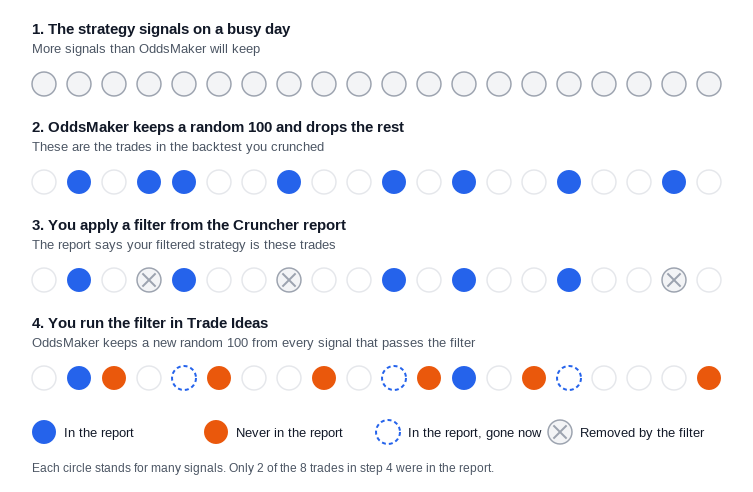
- The strategy signals more than 100 times.
- OddsMaker keeps a random 100. That's the backtest you upload and crunch.
- The Cruncher finds a filter that removes some of those trades. The report tells you what the remaining trades did.
- You add the filter in Trade Ideas and run OddsMaker again. The filter removes signals on this day, but if more than 100 are still left, OddsMaker keeps a new random 100 from them. Some are trades the report saw. Many are trades it never saw, because they were dropped in step 2. Some trades the report counted are now dropped instead.
The filter didn't stop working. The report measured it on one random sample of your day, and Trade Ideas ran it on another. The new backtest won't match the report, and if you crunch it again, the next filter has the same problem.
The Report Only Sees Part of Your Strategy
Even before you apply a filter, a capped backtest is lopsided. A day with 500 signals counts as 100 trades. A day with 80 signals counts as all 80. So the busiest days, often the days when the whole market is moving, count for far less than they should, and they may be the days that drive your results.
Every number in the report, from the baseline profit to each filter's improvement, comes from that lopsided sample.
What to Do
1. Tighten the strategy until no day reaches 100. Make the strategy pickier in Trade Ideas, with a higher minimum price, volume or relative volume, a narrower time window, or whatever fits how you trade, and run OddsMaker again. Check that no day has 100 trades before you crunch it. This is the simplest fix, and the backtest you crunch is then the whole strategy.
2. Split the strategy into several backtests, each under 100 a day. Run the same strategy more than once, each run covering one slice of stocks, such as average daily volume under 1 million, 1 to 5 million, and over 5 million. Each run gets its own 100-trade limit. Check that no day in any run hits 100, then combine the files into one backtest before you upload it. Keep the same columns in every run so the files line up. It's a pain, but you keep every trade the strategy takes.
3. Crunch it anyway, knowing what's going on. A capped backtest can still point you at ideas. Just don't expect a filter's numbers to hold when you run it in Trade Ideas. After you add a filter there, crunch the new backtest on its own terms and don't compare it with the old report. The more of your days hit the limit, the less the report tells you.
How the Strategy Cruncher Checks
For OddsMaker backtests, the Strategy Cruncher counts the days with 100 or more trades and compares that with the number of days in the backtest. It counts before any filter you applied in the Cruncher, so a report made with Apply this filter still shows the warning even when its days now have fewer than 100 trades: those trades still came from a capped backtest.