Symbol List Update Script
Documentation for the Symbol List Update script for updating an Amibroker database with the latest symbol list.
This process pulls the latest list from the freely available DTN symbol list.
Prerequisites
This Python script requires the requests library to retrieve the symbol list from DTN.
You can install the requests library by running the following command:
pip install requests
or
python -m pip install requests
Running the Code
In the download link above, you'll download a ZIP file called symbol_list_update.zip.
Extract the contents to a directory of your choosing. (I chose e:\symbol_list_update)
Open a command prompt and cd to the directory.
Type the following command to run the script.
python symbol_list_update.py
This pulls from this URL:
http://www.dtniq.com/product/mktsymbols_v2.zip
It unzips the file and creates a text file for import into Amibroker.
Example output
Here's the output you should see when you run the script:
PS E:\symbol_list_update> python .\symbol_list_update.py
Downloading ZIP from http://www.dtniq.com/product/mktsymbols_v2.zip...
Found file. Extracting...
NYSE -> 5445
NASDAQ -> 5250
NYSE_AMERICAN -> 304

Symbol Type Totals:
normal                         7857
ETF                            2459
Warrants                       412
Leveraged                      130
Rights                         90
Preferred                      27
ADR                            22
Convertible                    1
When Issued                    1

Writing symbol type lists...
Wrote .normal.tls (7857 symbols)
Wrote .ETF.tls (2459 symbols)
Wrote .Rights.tls (90 symbols)
Wrote .ADR.tls (22 symbols)
Wrote .Warrants.tls (412 symbols)
Wrote .Leveraged.tls (130 symbols)
Wrote .Preferred.tls (27 symbols)
Wrote .Convertible.tls (1 symbols)
Wrote .When_Issued.tls (1 symbols)
PS E:\symbol_list_update>
In the directory, the script will have created several files. The important one is .import.iqfeeddb
Here are the first few lines of the file:
"A","AGILENT TECHNOLOGIES","0"
"AA","ALCOA","0"
"AAA","ALTERNATIVE ACCESS FIRST PRIORITY CLO BOND ETF","0"
"AACB","ARTIUS II ACQUISITION INC. CLASS A","1"
"AACBR","ARTIUS II ACQUISITION INC. RT","1"
"AACBU","ARTIUS II ACQUISITION INC. UNT","1"
"AACG","CREATIVITY GLOBAL ADS","1"
"AADR","ADVISOR SHARES DORSEY WRIGHT ADR","1"
"AAL","AMERICAN AIRLINES GROUP INC. C","1"
"AALG","LEVERAGE SHARES 2X LONG AAL DAILY ETF","1"
Setting Up the Formatting Automation in Amibroker
There's some simple setup in Amibroker to make this process seamless.
There's a file in this directory called iqfeeddb.format. Copy this file to the Formats directory in your Amibroker installation.
Most likely the path is: c:\Program Files\Amibroker\Formats.
Then open the import.types file in that same Formats directory.
Add this line at the bottom:
IQFeed DB Import (*.iqfeeddb)|*.iqfeeddb|iqfeeddb.format
Once this is setup properly, when you go to File, Import ASCII..., you should see the IQFeed DB Import option.
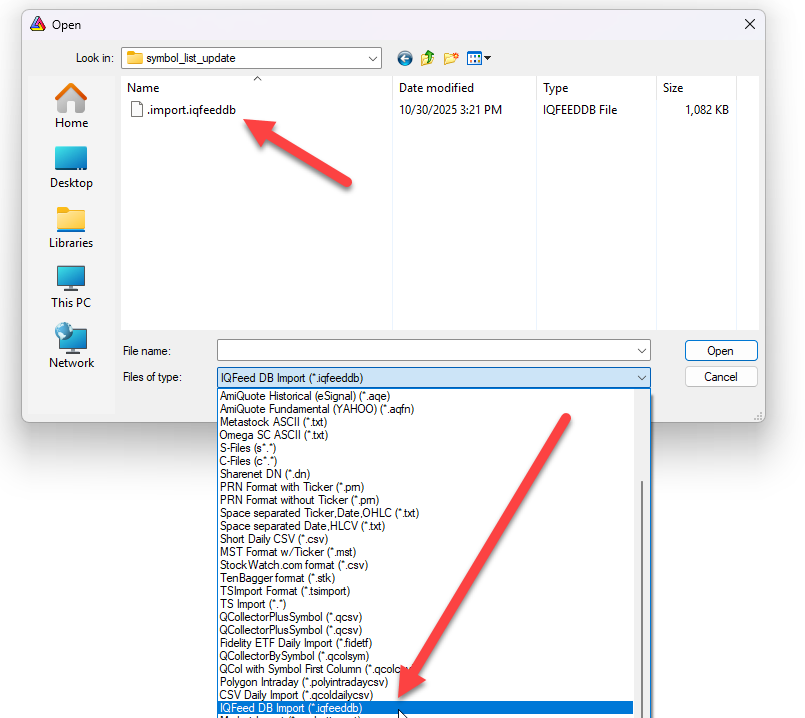
When the option is selected, the directory is filtered to show files ending in *.iqfeeddb. When you import one of these files,
the proper formatting will be applied and the list of symbols will be updated.
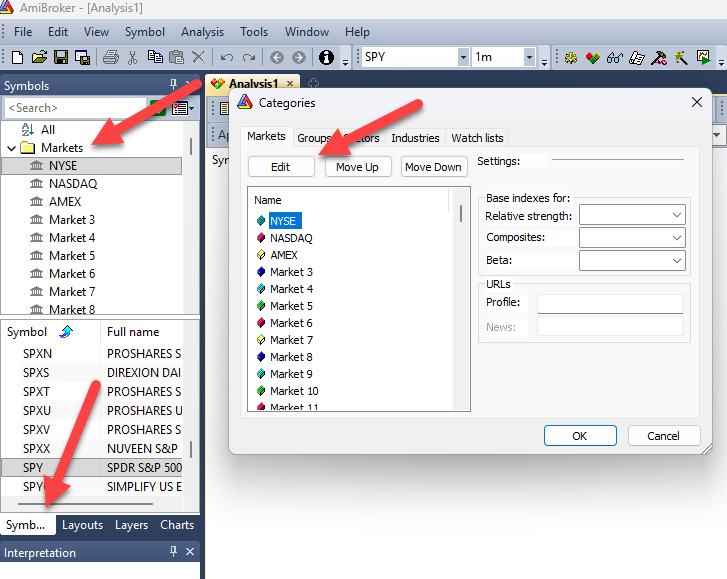
This format adds each symbol to its own Market category. On the Symbols tab, look for the Markets folder. By default these are named Market 0, Market 1, Market 2, etc. The stocks are classified in this order. You can use the Symbol, Categories item in Amibroker to rename them in your database (see screenshot below).
- Market 0 - NYSE
- Market 1 - NASDAQ
- Market 2 - AMEX
Import the File Into Amibroker
Now you should be able to go to Amibroker and import the file.
Choose File, Import ASCII...
Navigate to the folder where you ran the script.
Choose the IQFeed DB Import item from the Files of type field.
Choose .import.iqfeeddb from the list and click Open.
This should import the latest symbol list from IQFeed along with the company names for each symbol.