Interpreting the Optimization Report
How to interpret the Strategy Cruncher reports.
In the Top Columns section, you'll see the rules the Cruncher found in your backtest. Each one is an idea to test, not a finished strategy.
First of all, let's discuss what NOT to do with the suggestions.
Don't Do These Things
Don't Blindly Follow The Suggestion Without Thinking
The purpose of the report is to make you think more deeply about your strategy and determine what makes it work and what makes it not work.
The Strategy Cruncher is NOT an investment advisor. It is helping you learn more about your strategy and how YOU can make it better.
Don't Apply More Than One Suggestion From a Report
Some traders take one look at the report and apply ALL the suggested filters to their strategy.
This is WRONG. Each rule on a report was measured on its own against all of your trades, so the report can't tell you how two of them would work together. Often several of the top rules are the same idea measured different ways, and applying them all just applies that idea several times.
Don't Trust the Profit Numbers Alone
The Cruncher found every rule by searching your backtest for the best split, so every rule looks good on that backtest. That's what it was chosen for. The numbers come from the same trades the rule was found in.
Choosing a Rule
Sort by MK Score
Click MK Score in the Sort by buttons. This puts the rules most likely to keep working first.
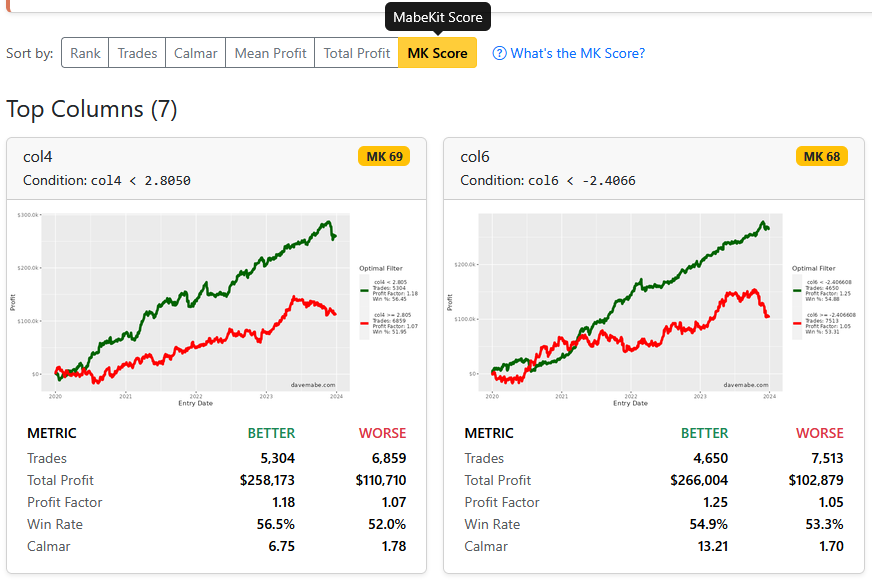
The cards are otherwise in the order the Cruncher found them, which often puts a few near-identical versions of the same idea at the top.
Check What Each Rule Costs You
For the top few cards, compare the Better column to the Baseline:
- Profit Factor: are the trades you'd keep better than what you have now?
- Trades: how many trades does the rule keep? A rule that keeps 30% of your trades throws away 70% of them
The MabeKit Score tells you how much to believe a rule. The profit factor and trade count tell you what it's worth. Read them together.
Ask Why It Should Work
Before you pick a rule, ask yourself why it should work for your setup. A rule you can explain is much more likely to hold up than one that happened to fit the data.
It's fine to pick nothing. If no rule makes sense to you, that's a useful answer too.
The Right Workflow
The right workflow is to:
- Review all the suggestions
- Sort by MK Score and think deeply about the top few
- Choose at most one suggestion
- Click Apply this filter on that card to crunch your file again with the rule applied
- Read the new report fresh and repeat
You don't need to rerun your backtest to apply a rule. The green funnel button takes you back to the confirm screen with the rule already filled in, along with any rules the report already had.
Read each new report fresh. Removing trades changes what the search finds, so the next best rule is often not the one that ranked second last time.
When the strategy looks finished, add the rules to your strategy itself and test it on dates the Cruncher never saw, or forward test it.
When the Report Isn't Helping
- Every rule drops more trades than it keeps. Run your next crunch in Keep Most Trades mode. It only reports rules that keep more trades than they remove
- The top rules are all the same idea. Exclude those columns in your next crunch to see what else is there
- Your backtest has both longs and shorts. Split it and crunch each side separately. Most columns mean different things for longs and shorts
Crunch Settings explains how to do each of these.
Go to the next lesson to learn how to get trades out of your own backtesting platform.